That’s why you can integrate NovaTalks with your CRM, so the customer’s history and request data end up right where they’re needed.
In this article we’ll break down how CRM integration works, which data is transferred automatically, and why it saves agents’ time.
How the Integration Works: Two Directions
The integration works in two directions: before the conversation starts and after it ends.
| Moment | What happens |
| When a conversation comes in | The card of that exact customer opens automatically in the CRM, and the agent immediately sees their history and context |
| When the conversation ends | The dialogue data is automatically transferred to the CRM: the request channel, the agent, and an AI summary of the conversation |
The customer’s timeline updates automatically, so the agent doesn’t have to manually refresh the page or add anything – the system does it itself.
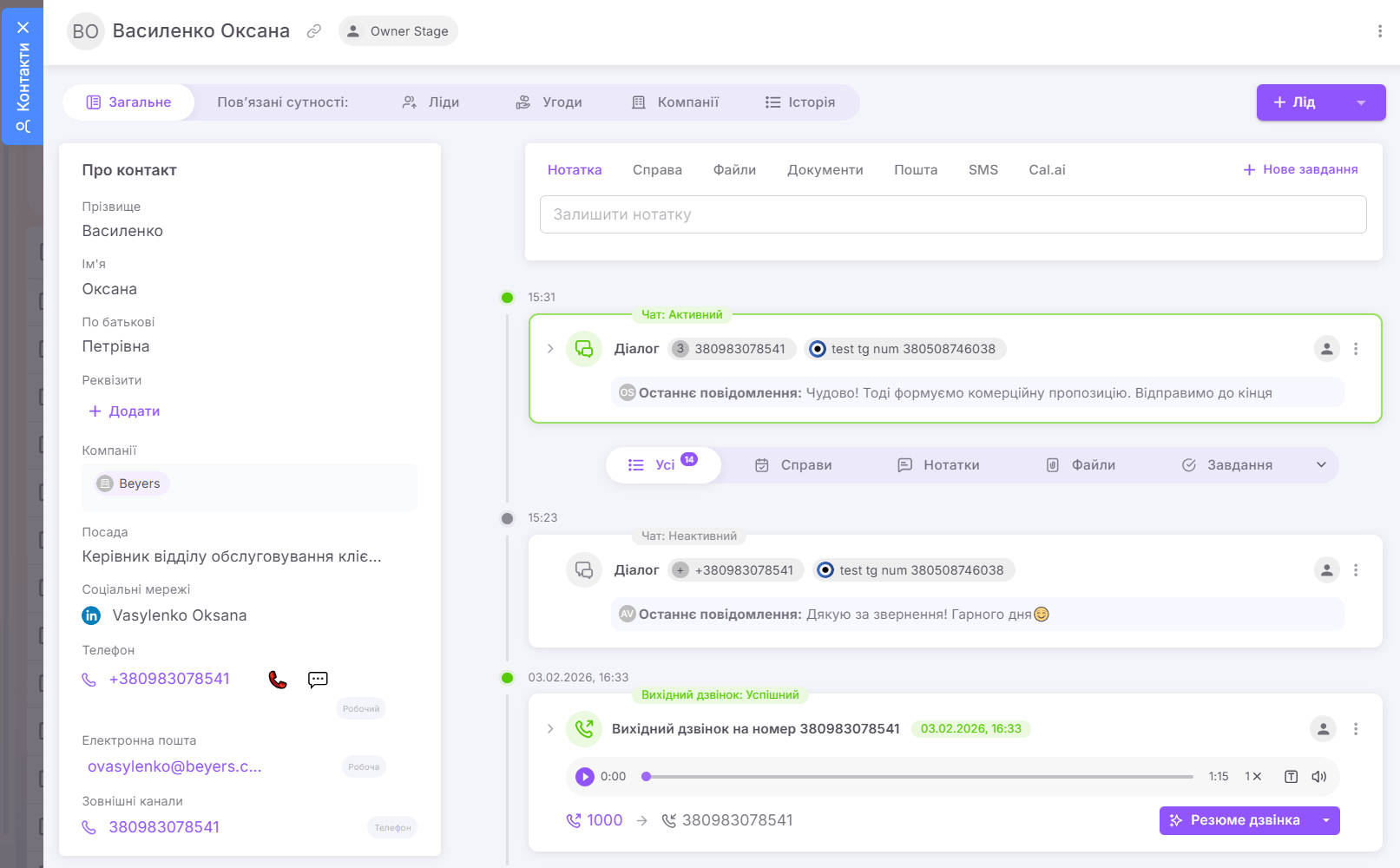
The customer’s card in the CRM with their communication history: dialogues, calls, and conversation summaries
What Data Ends Up in the CRM
The amount of data transferred is fully configurable to the company’s needs. Usually the CRM receives:
- the channel the customer reached out through;
- the agent who handled the conversation;
- an AI summary of the dialogue – a brief recap of the essence of the request and the key details;
- any additional fields important to your business.
The AI summary is convenient because, instead of manually noting down a recap of every conversation, the agent gets a ready-made brief description.
Integration with Any CRM
NovaTalks isn’t limited to a single system: the integration can be built with any CRM your business uses, tailored to your specific needs. The demonstrated example shows integration with NetHunt CRM, but the platform connects to other systems on the same principle.
And if you don’t need full integration yet, the platform can still transfer the data you need in the format you need.
What It Gives the Business
CRM integration gives agents several practical benefits:
- the agent sees the customer’s full context before the conversation even starts;
- the communication history is saved automatically, without manual entry;
- the AI summary saves time on noting down conversations;
- data is transferred in the amount and format you actually need;
- the integration works with any CRM the company uses.
As a result, agents spend less time on routine, and the customer gets a substantive answer faster.
Frequently Asked Questions (FAQ)
Which CRMs does the integration work with?
Practically any. The integration is built for the specific CRM the company uses. In the demonstrated scenario, that’s NetHunt CRM.
What does the agent see during the conversation?
As soon as a request comes in, the card of the corresponding customer opens automatically in the CRM, and the agent immediately sees their history, with no manual search.
Which data is transferred to the CRM after the conversation?
The request channel, the agent, and an AI summary of the dialogue, plus any additional fields. The set of data is configurable to the company’s needs.
Does the agent need to enter anything manually?
No. Data is transferred automatically, and the customer’s timeline updates on its own, without manually refreshing the page.
What is an AI conversation summary?
It’s a brief recap of the dialogue, generated automatically: the essence of the request and the key details. The agent doesn’t have to note the conversation down by hand.
Is full CRM integration mandatory?
No. If you don’t need full integration yet, the platform can still transfer the data you need in the format you need.
Conclusion
CRM integration turns every conversation into a source of useful data: the agent sees the customer’s full context, and the system saves the history and the AI summary itself. That means less routine for the team and fuller context in every conversation.
And if you combine the integration with the new video call channel, the agent will see the customer’s card right during a video conversation – we cover video calls in a separate article.
Want to set up integration with your CRM? The NovaTalks team will help connect the system to your needs.